


Tabs
This page has been automatically translated using the Google Translate API services. We are working on improving texts. Thank you for your understanding and patience.
Header
#include <gui/tabs.h>
Functions
| Tabs* | tabs_create (...) |
| void | tabs_OnSelect (...) |
| void | tabs_length (...) |
| void | tabs_tooltip (...) |
| void | tabs_add_elem (...) |
| void | tabs_set_elem (...) |
| void | tabs_ins_elem (...) |
| void | tabs_del_elem (...) |
| void | tabs_clear (...) |
| uint32_t | tabs_count (...) |
| void | tabs_selected (...) |
| uint32_t | tabs_get_selected (...) |
| const char_t* | tabs_get_text (...) |
| const Image* | tabs_get_image (...) |
Tabs are controls that display a series of tabs and that, as a general rule, allow you to dynamically change the content of an associated panel (Figure 1). In Hello TabControl! you have an example of this same thing. It is very important to note that the Tab control only shows the list of elements and responds to the user's clics, but does not require the existence of such panels associated with the tabs. What happens after clicking is the user's responsibility, so the control can be used for different purposes: For example, sorting a table using different criteria.
- Use tabs_create to create a tabs control.
- Use tabs_add_elem to add a tab.
- Use tabs_OnSelect to respond to the selection.
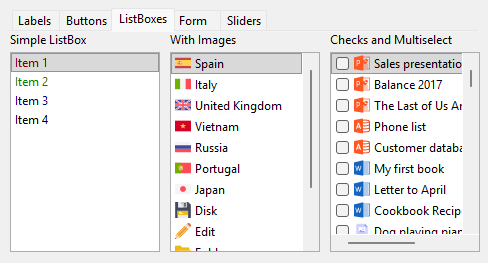
tabs_create ()
Create a new tab control.
Tabs*
tabs_create(const gui_pos_t pos);
| pos | The orientation of control. |
Return
The newly created tabs.
tabs_OnSelect ()
Sets a handler for new tab selection.
void
tabs_OnSelect(Tabs *tabs,
              Listener *listener);
1 2 3 4 5 6 7 |
static void i_OnSelect(App *app, Event *e) { const EvButton *p = event_params(e, EvButton); do_something_onselect(app, p->index); } ... tabs_OnSelect(tabs, listener(app, i_OnSelect, App)); |
| tabs | Tab control. |
| listener | Callback function that will be called after selecting a new tab. |
Remarks
Ver GUI Events.
tabs_length ()
Sets the default length of the control.
void
tabs_length(Tabs *tabs,
            const real32_t length);
| tabs | Tab control. |
| length | The length (horizontal or vertical). |
tabs_tooltip ()
Assigns a tooltip to the tab control.
void
tabs_tooltip(Tabs *tabs,
             const char_t *text);
| tabs | Tab control. |
| text | UTF8 C-string terminated in null character |
tabs_add_elem ()
Adds a new element to the tab control.
void
tabs_add_elem(Tabs *tabs,
              const char_t *text,
              const Image *image);
| tabs | Tab control. |
| text | The text of the element in UTF-8 or the resource identifier. Resources. |
| image | Icon associated with the resource element or identifier. For space, it will scale to a maximum height of 16 points. The control will retain a copy of the image. The original image must be destroyed, unless it was obtained with image_from_resource. |
tabs_set_elem ()
Edit a tab control element.
void
tabs_set_elem(Tabs *tabs,
              const uint32_t index,
              const char_t *text,
              const Image *image);
| tabs | Tab control. |
| index | The index of the item to replace. |
| text | The text of the element in UTF-8 or the resource identifier. Resources. |
| image | Icon associated with the resource element or identifier. For space, it will scale to a maximum height of 16 points. |
tabs_ins_elem ()
Inserts an element into the tab control.
void
tabs_ins_elem(Tabs *tabs,
              const uint32_t index,
              const char_t *text,
              const Image *image);
| tabs | Tab control. |
| index | The index of the element to insert. |
| text | The text of the element in UTF-8 or the resource identifier. Resources. |
| image | Icon associated with the resource element or identifier. For space, it will scale to a maximum height of 16 points. |
Remarks
It works the same as popup_add_elem, but inserting at an arbitrary position, instead of at the end of the list.
tabs_del_elem ()
Removes an element from the tab control.
void
tabs_del_elem(Tabs *tabs,
              const uint32_t index);
| tabs | Tab control. |
| index | The index of the element to be deleted. |
tabs_clear ()
Delete all tabs.
void
tabs_clear(Tabs *tabs);
| tabs | Tab control. |
tabs_count ()
Gets the number of items in the tab control.
uint32_t
tabs_count(Tabs *tabs);
| tabs | Tab control. |
Return
The number of elements.
tabs_selected ()
Sets the selected tab.
void
tabs_selected(Tabs *tabs,
              const uint32_t index);
| tabs | Tab control. |
| index | The item to select. If we pass |
tabs_get_selected ()
Gets the selected item of the tab control.
uint32_t
tabs_get_selected(const Tabs *tabs);
| tabs | Tab control. |
Return
The selected item.
tabs_get_text ()
Gets the text of a tab control element.
const char_t*
tabs_get_text(const Tabs *tabs,
              const uint32_t index);
| tabs | Tab control. |
| index | The index of the element. |
Return
The text of the element.
tabs_get_image ()
Gets the icon of a tab control item.
const Image*
tabs_get_image(const Tabs *tabs,
               const uint32_t index);
| tabs | Tab control. |
| index | The index of the element. |
Return
The icon (can be NULL).